- Get started with Reclaimit
- Working in Reclaimit
- Solving errands in Reclaimit
Table of Contents:
In order to complete a customer errand, and make a decision, in Reclaimit you will use a so called Status. From the errand Overview, these can be found under Events -> Change status. The statuses can also be found directly in the Search result.
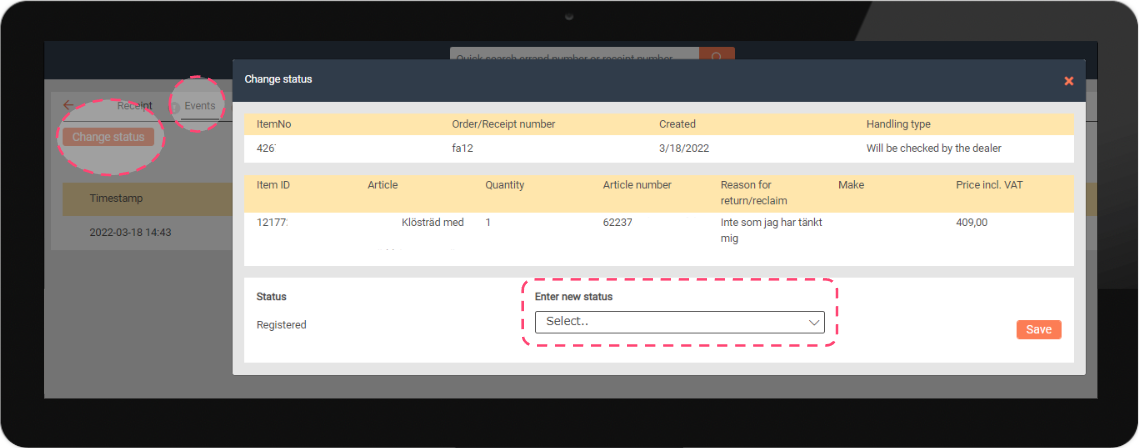
In the list below, you will find which Status goes with which Issue Type, and what the effect is:
Missing Shipment
| Errand approved |
The customer is refunded the full price for the article in question. |
| Case approved, the item will be discarded |
This status is not for use, except with the Issue Type Regret. If this status is used here, it will refund the customer in full according to the above status. |
| Approved with deduction |
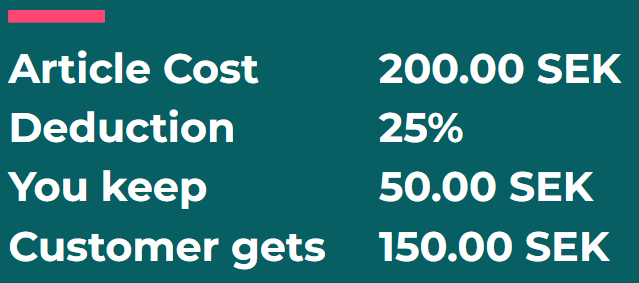
The customer will receive a Partial refund. You submit, in percentages, the sum you wish to keep. 20 % deduction = you keep 20% of the article price, customer is refunded 80 %. (See image below for clarification) |
| Errand approved, new product |
You send a new product to the customer, no financial refund occurs. This status is also used when sending spare parts. |
| Errand rejected |
The customer errand is rejected. This is used when the article is not missing, for example if you have provided a tracking number showing the article can be fetched at a pick-up location. |
| Not submitted/changed |
The customer stopped replying, and you are unable to solve the errand. This cancels the errand. |
Complaint
| Errand approved | The customer is refunded the full price for the article in question. |
| Case approved, the item will be discarded | This status is not for use, except with the Issue Type Regret. If this status is used here, it will refund the customer in full according to the above status. |
| Approved with deduction | The customer will receive a Partial refund. You submit, in percentages, the sum you wish to keep. 20 % deduction = you keep 20% of the article price, customer is refunded 80 %. (See image below for clarification) |
| Errand approved, new product | You send a new product to the customer, no financial refund occurs. This status is also used when sending spare parts. |
| Errand rejected |
The customer errand is rejected. This status is used if the complaint is invalid, such as when the customer actively caused the damages or if the customer claim is incorrect. |
| Not submitted/changed | The customer stopped replying, and you are unable to solve the errand. This cancels the errand. |
Regret
| Errand approved |
The customer is refunded the full price for the article in question, an automatic deduction is performed for the return slip used by the customer. |
| Case approved, the item will be discarded |
The customer is refunded the full price for the article in question, but they are not debited for the return slip. This status is used if you approve a Regret without asking for the article returned. |
| Approved with deduction | The customer will receive a Partial refund. You submit, in percentages, the sum you wish to keep. 20 % deduction = you keep 20% of the article price, customer is refunded 80 %. (See image below for clarification) |
| Errand approved, new product |
This status is not for use with Regrets, since a customer regretting their purchase should never have a new article shipped to them. |
| Errand rejected |
The customer errand is rejected. This status is used if the regret is invalid, such as when the customer actively caused damages or if the customer claim is invalid. |
| Not submitted/changed | The customer stopped replying, and you are unable to solve the errand. This cancels the errand. |
Approved with deduction
When partially refunding a customer, that is refunding part of the article price but not the full price, you submit the deduction in percentages.
You submit what you want to deduct from the customer, that is the sum you wish to keep. A deduction of 20 % means you keep 20 % of the article price, and the customer gets refunded 80 % of the article cost.
Advanced Statuses
Reclaimit contains other status, these are rarely used but are still present in the system.
| Errand approved, manual handling |
The customer is refunded the full article price for the article in question, but no information is submitted to the customer. You must email them. |
| The errand needs to be updated |
The customer errand is paused. This status is not for use, it will be activated automatically when you send a reply to a customer without changing status. |
| To follow up |
The customer errand is paused. This status is not for use. |
| Escalated |
The errand is escalated to Fyndiq. You are handing over the ownership of the errand to us. This is used if for example you cannot agree with the customer, or if they have reported the wrong article and should be speaking to a different merchant. |
| Being processed |
The customer errand is opened. This status is not for use, it is automatically activated when the customer responds to you. These are to be replied to within 72 hours (Mon-Fri) to avoid automatic refunds. |
Was this article helpful?
That’s Great!
Thank you for your feedback
Sorry! We couldn't be helpful
Thank you for your feedback
Feedback sent
We appreciate your effort and will try to fix the article